
AI Automation
AI Automation for Small Businesses: The Complete 2026 Guide
Small businesses use AI automation to reclaim hours of repetitive work every week and expand capacity without adding headcount.
The free 30-minute AI Operations Audit is a conversation about a normal week in your business and where the work piles up. We find the one change that would give you the most time back and send you a plain-English plan for it. No forms and no pitch.
Book a free AI audit
Patrick Gibbs
AI automation for small businesses means using artificial intelligence to handle repetitive, time-consuming tasks without human involvement. The most common starting points are appointment scheduling, lead follow-up, invoice reminders, and customer onboarding. Small businesses that implement AI automation consistently report saving significant staff hours every week and expanding operational capacity without adding headcount.
What "AI Automation" Actually Means for a Small Business
AI automation is not a single product you buy. It's a category of tools that connect to your existing software and handle tasks that currently eat up your time. Think of it as hiring a digital employee that works inside your CRM, email, calendar, and phone system simultaneously.
The key difference between AI automation and older "automation" (like email autoresponders or basic Zapier workflows) is decision-making. Older tools follow rigid if-then rules. AI automation reads context, understands intent, and adapts its behavior. When a lead fills out your contact form after hours, AI automation doesn't just send a canned response. It reads the inquiry, identifies what the person actually wants, crafts a relevant reply, and books a follow-up based on your calendar availability.
Most small businesses that adopt AI automation report it was easier to implement than expected. The tools have matured significantly since 2023, when most options required custom coding or expensive consultants. For a detailed breakdown of how much AI automation costs in 2026, the pricing has dropped to accessible levels across every category.
What Can Actually Be Automated
Nearly every repetitive communication and data-entry task in a small business can be automated. The highest-ROI automations are lead response (speed-to-lead), appointment management, review collection, payment follow-up, and customer onboarding sequences.
Lead Response and Follow-Up
This is the single highest-ROI automation for most small businesses. Research published in Harvard Business Review ("The Short Life of Online Sales Leads", March 2011) found that the odds of qualifying a lead fall off sharply soon after an inquiry. Most small businesses respond too slowly. AI closes that gap with near-immediate response, a dynamic explored in depth in our guide on improving close rates with AI automation.
What it looks like: A new lead comes in through your website form, Google ad, or social media. The AI instantly sends a personalized text and email, asks qualifying questions, and offers to book a consultation. If the lead responds, the AI continues the conversation. If they don't, it follows up on a schedule you set.
Appointment Scheduling and Reminders
Appointment-based businesses routinely lose a meaningful share of bookings to no-shows. Automated reminder sequences keep the appointment visible before the visit and make rescheduling easier. When a cancellation comes in, automated waitlist management helps fill the slot before it goes empty.
Review and Reputation Management
Asking for reviews manually is inconsistent. Automation sends a review request soon after a completed appointment, when satisfaction is fresh. Businesses that automate review requests tend to ask more consistently than teams relying on memory and spare time.
Payment Collection
Overdue invoices cost small businesses serious money in delayed or lost payments. Automated payment reminders with a direct payment link can recover overdue invoices without requiring a phone call.
Customer Onboarding
New customer paperwork, welcome emails, account setup steps, first-appointment prep instructions. These are all repeatable sequences that AI handles consistently, ensuring no new customer falls through the cracks.
Industry-Specific Automation Examples
Every industry has its own set of high-value automation targets. The table below maps the most impactful automations by business type and where the time savings usually appear.
| Industry | Top Automation | What It Does | Where Time Is Recovered |
|---|---|---|---|
| Med Spa | Treatment follow-up | Sends post-treatment care instructions, rebooking reminders, and product recommendations automatically | Repeated follow-up and rebooking coordination |
| Med Spa | Consultation booking | AI answers calls, qualifies callers, and books consultations into provider calendars | Call handling, qualification, and calendar lookup |
| Dental | Recall system | Identifies patients overdue for cleanings/checkups and sends multi-channel reminders until they book | Manual recall outreach and follow-up tracking |
| Dental | Insurance verification | Pulls patient insurance details and verifies coverage before the appointment | Eligibility checks and coverage follow-up |
| HVAC/Plumbing | Emergency dispatch | AI triages after-hours emergency calls, dispatches on-call techs, and confirms ETAs with homeowners | After-hours triage and dispatch coordination |
| HVAC/Plumbing | Seasonal campaigns | Automatically contacts past customers when seasonal maintenance is due (furnace tune-ups, AC checks) | Recurring campaign setup and seasonal follow-up |
| Restaurant | Reservation management | Handles booking, modification, and cancellation via phone, text, and web without staff involvement | Reservation edits, cancellations, and phone coverage |
| Restaurant | Review response | Drafts and posts responses to Google/Yelp reviews within hours of posting | Drafting and routing review responses |
| Home Services | Quote follow-up | Sends follow-up sequences to prospects who received quotes but haven't booked | Follow-up sequence management |
| Legal | Client intake | Collects case details, conflict checks, and engagement letter signatures before the first meeting | Intake collection and document routing |
| Real Estate | Lead nurturing | Maintains contact with long-cycle buyers/sellers through automated, personalized check-ins | Long-cycle follow-up and lead nurturing |
ROI Expectations: What the Numbers Look Like
Small businesses should evaluate AI automation by comparing recovered revenue, staff time saved, and avoided manual work against the full tool and setup cost. The primary returns often come from captured leads and filled appointments, not just cost savings.
Here's how to calculate your expected ROI for the most common automations:
Lead Response Automation ROI
Use your own lead data for this calculation:
- Current: monthly leads multiplied by current conversion rate multiplied by average customer value.
- With AI: monthly leads multiplied by your measured conversion rate after faster response.
- Gain: new revenue minus the tool, setup, and maintenance cost.
No-Show Reduction ROI
Use your own appointment data for this calculation:
- Current loss: missed appointments multiplied by average appointment value.
- With automated reminders: remaining missed appointments after the reminder workflow is live.
- Recovered value: current loss minus remaining loss.
- Cost: reminder software, SMS usage, setup, and review time.
After-Hours Call Capture ROI
Many service businesses receive meaningful calls outside business hours. Without AI, these go to voicemail. With AI, they can be answered and booked. Calculate the upside by multiplying additional booked appointments by average appointment value, then subtract the full AI phone system cost.
Getting Started: A Practical 5-Step Process
The best approach is to start with one high-impact automation, prove it works, then expand. Trying to automate everything at once leads to messy implementations and wasted money.
Step 1: Audit Your Time Drains
Track how your team spends time across a normal operating period. Write down every task that is repetitive, frequent, and doesn't require specialized expertise. Common findings include answering the same questions on the phone, sending appointment reminders manually, chasing down unsigned paperwork, and copying data between systems.
Step 2: Pick Your First Automation
Choose the task that is highest frequency, has the most direct revenue impact, and is closest to a "solved problem" (meaning there are off-the-shelf tools for it). For most businesses, this is either lead response automation or AI phone answering.
Step 3: Select a Tool
You don't need a custom-built system. Established platforms exist for every common automation:
| Automation Type | Popular Tools | Cost Driver |
|---|---|---|
| AI phone answering | Bland AI, Goodcall, Smith.ai | Call volume, voice quality, and integration depth |
| Lead follow-up | GoHighLevel, Keap, HubSpot | Contact count, CRM tier, and workflow complexity |
| Appointment reminders | Calendly, Acuity, your existing EHR/CRM | Reminder channel, SMS usage, and calendar features |
| Review requests | Birdeye, Podium, NiceJob | Location count, review volume, and response workflow |
| Workflow connector | Zapier, Make.com, n8n | Task volume, app count, and hosting model |
| Custom AI chatbot | Intercom, Drift, Tidio | Conversation volume, support channels, and handoff rules |
Step 4: Implement and Test
Set up the tool, connect it to your existing systems, and run it in parallel with your current process before it fully owns the workflow. This means the AI handles the task but a human reviews the output before it goes to the customer. Check for accuracy, tone, and edge cases. Fix anything that's off.
Step 5: Go Live and Measure
Turn it on for real. Track the metrics that matter: time saved, revenue impact (new bookings, recovered leads, reduced no-shows), and customer satisfaction (are people complaining or happy?). After enough real usage, you'll have the data to decide whether to expand, adjust, or try a different approach.
For additional background, see How to Learn AI Automation in 2026: A No-Fluff Roadmap.
What Most Small Businesses Get Wrong
The three most common automation failures are: trying to automate too many things at once, choosing tools based on features instead of integration compatibility, and not measuring results after launch.
Mistake 1: The "automate everything" approach. A dental practice that tries to simultaneously automate phone answering, patient recall, insurance verification, and review collection will likely botch the rollout. Start with one. Get it running smoothly. Then add the next.
Mistake 2: Ignoring your existing software stack. The best automation tool is the one that connects cleanly to what you already use. An AI phone system that doesn't integrate with your scheduling software creates more work, not less. Before buying anything, verify integration with your calendar, CRM, and payment processor.
Mistake 3: Set-and-forget. Automation is not a toaster. It needs periodic attention. Business rules change, staff changes, pricing changes, hours change. Schedule a regular review of your automations to make sure they still reflect reality. Many automation projects that "failed" actually worked fine at launch but degraded because nobody maintained them.
Mistake 4: Automating a broken process. If your current scheduling workflow is confusing, automating it just makes the confusion faster. Fix the process first, then automate the fixed version. Automating chaos produces automated chaos.
How AI Automation Changes as Your Business Grows
Solo operators typically start with phone and scheduling automation. Growing teams add marketing and operations automation. Larger companies move into custom AI workflows and multi-department orchestration. The right budget depends on workflow scope, call volume, integrations, and how much support you need.
| Business Stage | Budget Driver | Best Automations | Scope |
|---|---|---|---|
| Solo / startup | Simple call and scheduling needs | AI phone, lead response, scheduling | Single workflow or narrow tool stack |
| Small team | More channels, more follow-up, more handoffs | Above + review collection, payment reminders, onboarding | Multiple connected workflows |
| Growing | Department handoffs and reporting needs | Above + marketing automation, reporting dashboards, inventory | Operations and marketing automation |
| Established | Custom workflows and multi-location coordination | Custom AI workflows, multi-location coordination, predictive analytics | Custom systems and ongoing optimization |
The important thing is that automation scales with you. You don't need to buy the enterprise plan on day one. Start where you are, prove the value, and expand as revenue justifies it. Our guide to automating repetitive tasks provides a concrete roadmap for this phased approach.
See our AI workflow automation guide for small business for the complete implementation framework. Learn how to eliminate manual data entry with AI across your operation. For service-specific workflows, see our service business workflow automation guide.
Choose the implementation route around the work: AI agents for a bounded decision-and-action process, web applications for a tool people use directly, and websites for the public pages where customers find and contact you.
Frequently Asked Questions
Q: Do I need technical skills to set up AI automation?
No. Most modern automation tools are designed for non-technical business owners. They use visual interfaces, plain-English configuration, and guided setup wizards. For more complex implementations, hiring an AI automation consultant can save trial and error when the workflow touches multiple systems.
Q: Will AI automation make my business feel impersonal?
Only if you implement it badly. Good automation feels like better service, not less human. When a patient gets a friendly reminder before their appointment, they don't think "that was automated." They think "that was helpful." The key is using AI for the repetitive tasks so your team can spend more time on the personal interactions that actually matter.
Q: How long does it take to see results?
Timing depends on the workflow. Lead response and phone automation can show operational signals quickly because you can see answered calls and faster follow-up. Appointment reminders and review collection need enough volume to compare before and after. Complex workflow automation needs a longer measurement window because there are more handoffs and edge cases.
Q: What if something goes wrong?
Every good automation has a human fallback. AI phone systems transfer to a person when they can't handle a call. Automated emails route replies to your inbox. The goal is not to remove humans from the loop entirely. It's to remove them from the repetitive parts so they're available for the moments that require judgment and empathy.
Q: Can I automate my marketing too?
Yes. Social media scheduling, email campaigns, ad optimization, and content distribution can all be automated. However, the content itself should still be created or reviewed by a human. Automated posting of human-created content works well. Fully AI-generated marketing content without human review tends to feel generic and can damage your brand voice over time.
Q: How do I know which tasks to automate first?
Rank your repetitive tasks by two criteria: frequency (how often it happens) and revenue impact (how directly it affects income). The task that scores highest on both axes is your first automation target. For most small businesses, that's either speed-to-lead response or after-hours phone handling.
Q: Is this just for tech-savvy businesses?
No. The businesses getting the most ROI from AI automation are often in "traditional" industries: plumbing companies, dental practices, law firms, and restaurants. These businesses have high call volumes, lots of scheduling, and repetitive administrative tasks. They also tend to compete locally, where capturing one more lead per day has an outsized impact on annual revenue. A plumber who answers every call at midnight books jobs that the plumber who lets calls go to voicemail never sees.
Explore AI automation for your specific industry. Check our industry automation guides and location-specific resources to see what tools and workflows work best for businesses like yours. For a complete implementation roadmap, book a free consultation with Epiphany Dynamics.
Patrick Gibbs
AI Automation Expert
Patrick Gibbs helps professional practices implement AI automation that captures more leads, books more appointments, and scales without adding overhead. He's the founder of Epiphany Dynamics and creator of the AI Front Desk system.
Related Solutions
Build this into a real workflow
Related Posts
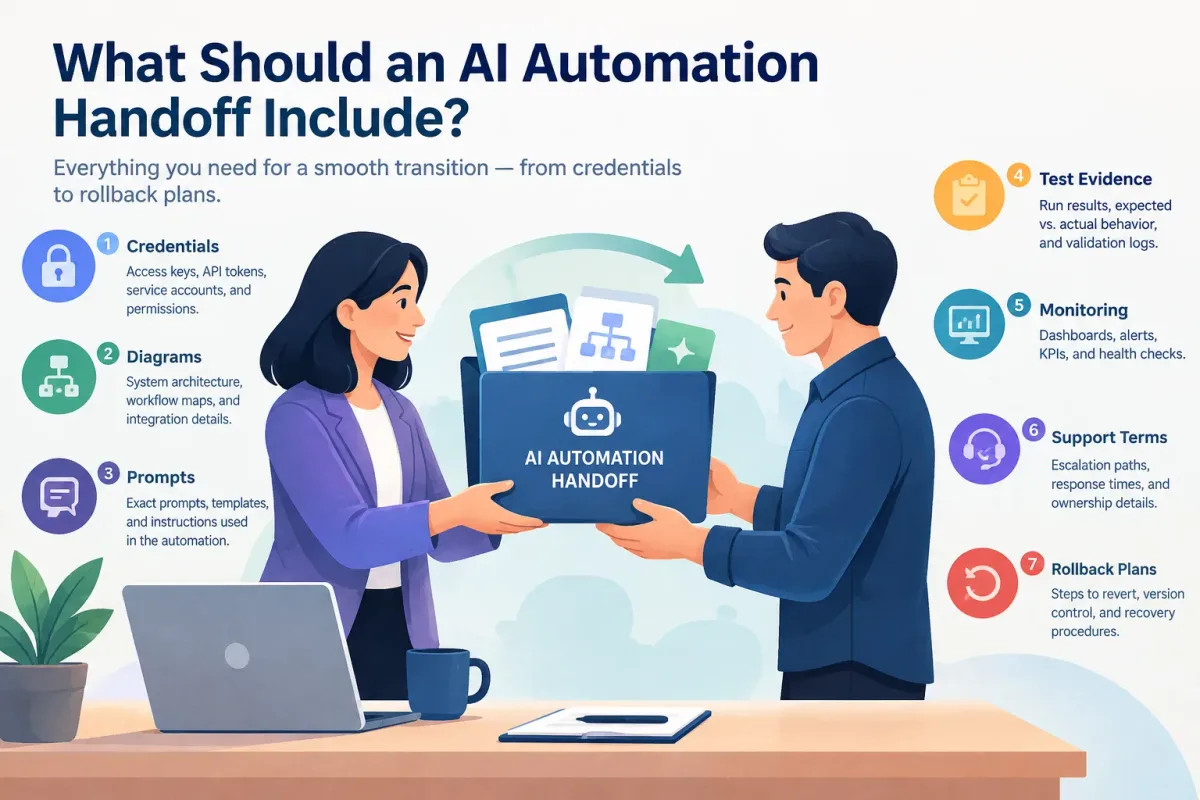
What Should an AI Automation Handoff Include?
Learn what a complete AI automation handoff includes: credentials, diagrams, prompts, test evidence, monitoring, support terms, and rollback plans.
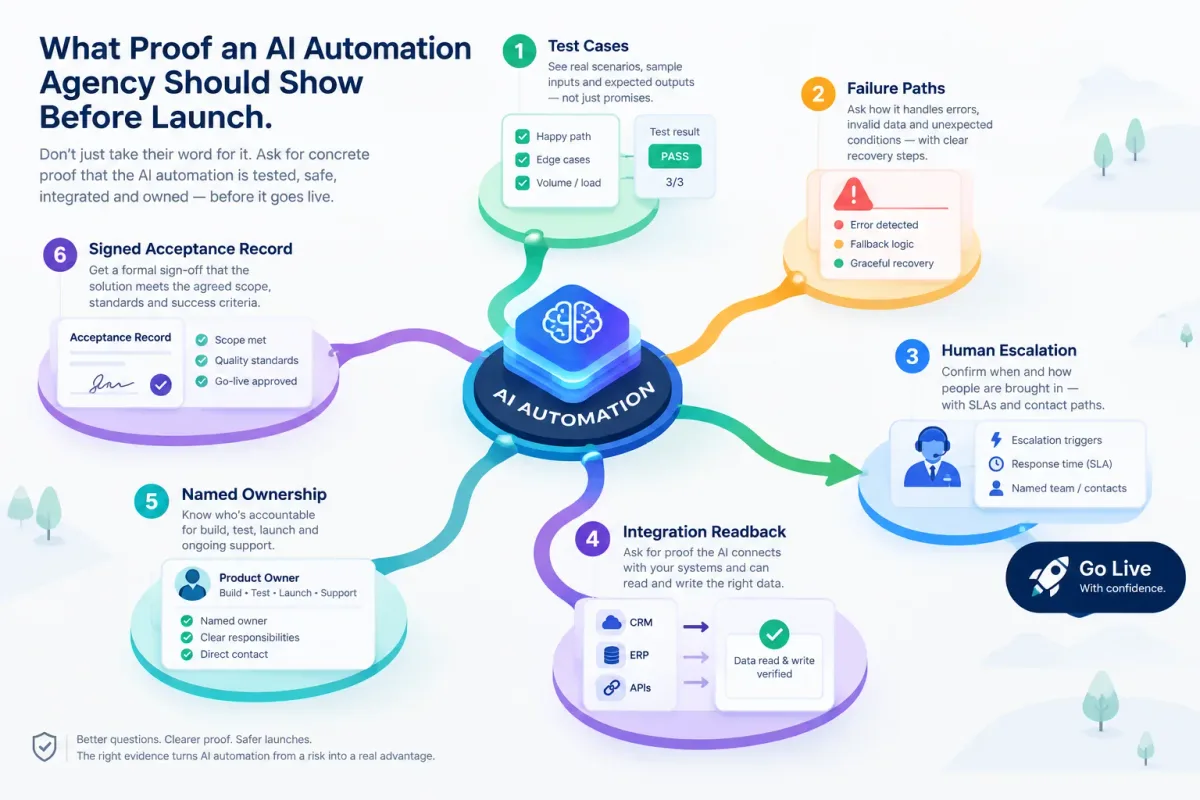
What Proof an AI Automation Agency Should Show Before Launch
Before an AI automation goes live, ask for test cases, failure paths, human escalation, integration readback, named ownership, and a signed acceptance record.
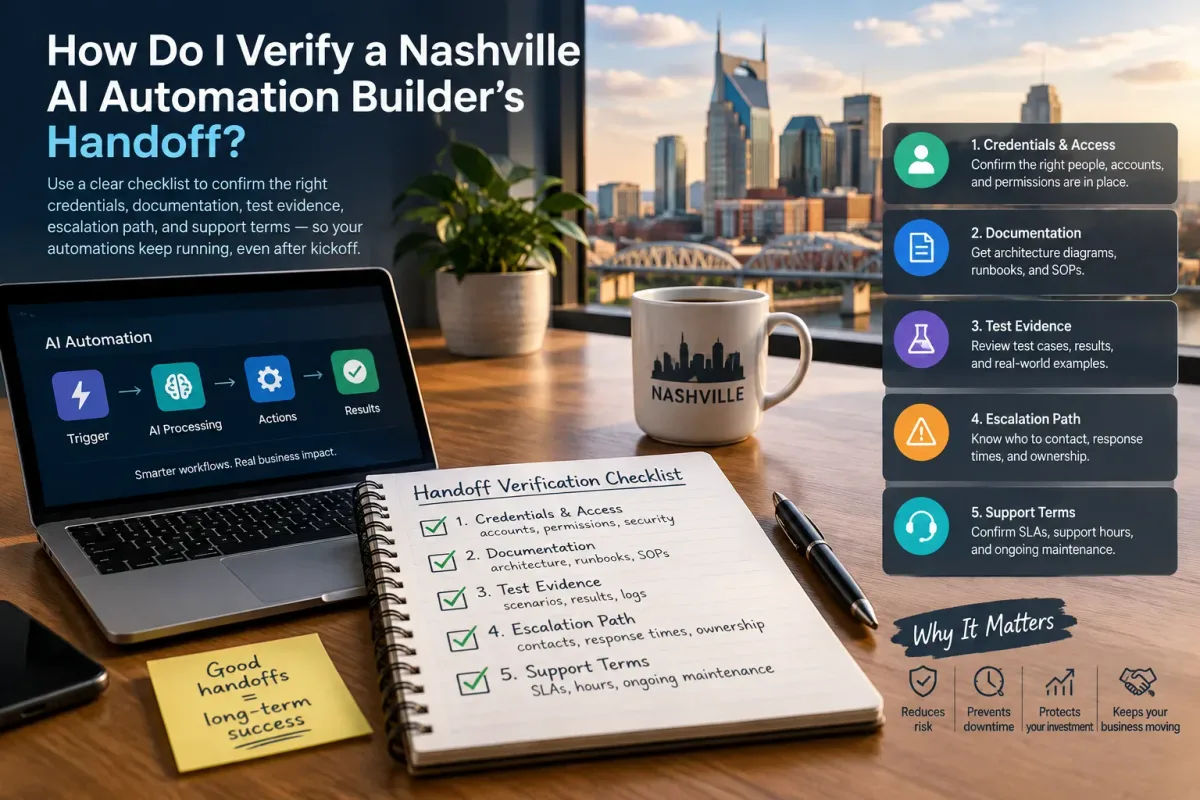
How Do I Verify a Nashville AI Automation Builder's Handoff?
Verify a Nashville AI automation builder's handoff with a checklist covering credentials, docs, test evidence, escalation, and support terms.