
How-To Guides
How to Train AI on Your Business: From Chatbots to Workflow Automation
Generic chatbots hallucinate your policies and make up phone numbers. Trained ones answer from your actual business knowledge and escalate when needed.
The free 30-minute AI Operations Audit is a conversation about a normal week in your business and where the work piles up. We find the one change that would give you the most time back and send you a plain-English plan for it. No forms and no pitch.
Book a free AI audit
Patrick Gibbs
Training AI on your business data means teaching a language model to answer accurately based on your specific documentation, policies, and services rather than generic internet knowledge. For chatbots, this involves three methods: prompt engineering, retrieval-augmented generation (RAG), or fine-tuning. RAG is the right starting point for most businesses because it requires no machine learning expertise and updates instantly when your information changes.
The gap between a generic chatbot and one that actually handles your customers' questions is almost entirely a training problem. Deploy a raw language model with no customization, and you get a bot that invents your return policy, makes up phone numbers, and sends customers in circles. Train it correctly on your actual documentation, and it answers accurately, knows what it can't handle, and escalates at the right moment.
What "Training" an AI Chatbot Actually Means
In 2026, "training" a chatbot rarely means retraining a neural network from scratch. It means one of three things: prompt engineering (configuring how a base model behaves), retrieval-augmented generation or RAG (connecting the model to your documents), or fine-tuning (adjusting model weights on specific data). RAG is the right starting point for most businesses because it requires no machine learning expertise and updates instantly when your information changes.
This distinction matters because businesses frequently overbuild. Full fine-tuning requires labeled training examples, significant compute costs, and a retraining process whenever your information changes. RAG lets you update the knowledge base by editing a document. No downtime, no retraining. Prompt engineering is the simplest approach, but it falls apart when users ask questions your instructions didn't anticipate.
The table below compares all three methods on the dimensions that actually matter for a business deployment. Most small and mid-sized businesses land in the RAG row. Fine-tuning is rarely the right call unless you have a very high-volume, very repetitive use case with thousands of labeled historical conversations to draw from.
| Method | Best For | Cost Pattern | Deployment Pattern | Skill Required |
|---|---|---|---|---|
| Prompt Engineering | Simple FAQ and triage bots | Lowest setup cost | Fastest to configure | Low |
| RAG (knowledge base) | Business policies, products, services | Subscription or platform cost | Depends on document readiness | Low to medium |
| Fine-tuning | High-volume tasks with strict formatting needs | Highest implementation cost | Longest and most specialized | High |
Step 1: Define the Job Before You Build Anything
The most common reason chatbot projects fail is scope defined too broadly at the start. Pick one specific job: answering product questions, handling booking requests, qualifying inbound leads, or managing basic support. A bot trying to do everything does nothing well. Start narrow, measure results during the rollout, then expand to adjacent tasks once you have baseline performance data.
The scoping exercise is more straightforward than it sounds. Pull recent support tickets, chat logs, or call transcripts and categorize every query by type. Look for the single category with the highest volume of repetitive, predictable questions. That's your starting point. For a dental office, it's often appointment scheduling and insurance questions. For an e-commerce store, it's order status and return requests. One job done well is worth more than a broad bot that handles every job poorly.
Get specific about escalation conditions before you touch any platform. Document exactly what should trigger a handoff to a human: angry language, billing disputes, certain question categories, requests for a manager. This decision tree shapes everything about how you configure the bot. The scoping logic in dental practice AI workflow automation illustrates how proper job definition plays out in a real deployment, and the reasoning transfers across most service industries.
Step 2: Collect and Clean Your Training Data
The quality of your chatbot's answers depends almost entirely on the quality of your source documents. A useful business chatbot needs structured, current, non-contradictory content. Expect data cleaning to be a major part of the project, because raw business documents are full of contradictions, outdated sections, and formatting that confuses retrieval systems.
Start with what you already have: your FAQ page, service descriptions, pricing, policies, and any written training materials you've built for staff. If you have past chat logs or call recordings, extract the most common questions and write clean, direct answers for each. A structured Q&A document often outperforms a dense policy manual in retrieval quality, since it mirrors how users actually phrase real questions.
Three problems consistently produce wrong answers in deployed chatbots: contradictory information across documents, ambiguous references that made sense in human context but confuse a retrieval system, and outdated content that was never removed. A clean knowledge base outperforms a larger messy one. For businesses running appointment-based operations, note that static availability information without a live calendar connection creates new problems, not solutions. Automated scheduling software covers the real-time integration layer in detail, which is a separate step from knowledge base training but needs to be planned for from the start.
Step 3: Choose a Platform and Configure Your Method
For most service businesses, a RAG-based platform like Voiceflow, Botpress, or Tidio is the right starting point. These tools let you upload documents, set retrieval rules, and configure escalation paths without writing code. Fine-tuning only makes sense when you have thousands of labeled conversations and formatting requirements that prompt engineering cannot meet.
Platform selection affects ongoing maintenance burden more than initial launch experience. Proprietary platforms like Intercom Fin and Zendesk AI integrate tightly with CRMs but lock you into their pricing. Open-source options like Botpress offer control at the cost of developer maintenance. Mid-market platforms like Voiceflow and Tidio balance cost, flexibility, and no-code updates well for most small businesses. Pick based on where your information lives and how often it changes, not based on feature lists.
When configuring a RAG system, pay close attention to document chunking. Most platforms break content into segments automatically, but the default settings aren't always right for your specific documents. After you run test queries, review which ones return the wrong source segments and adjust from there. This single configuration decision has more impact on answer quality than most people expect.
Step 4: Test Thoroughly Before Going Live
Testing should cover three categories: expected queries (things users will definitely ask), edge cases (ambiguous or out-of-scope questions), and adversarial queries (attempts to make the bot fabricate information). Run a broad enough test set to cover real customer language before any public deployment. Document failures by type, not just frequency, because the failure category tells you exactly what to fix.
The testing phase reveals knowledge base gaps faster than any other process. When the bot fails a query, the fix is almost never "adjust the model." It's "add or fix the source document." Keep a failure log organized by category: unanswered questions, wrong answers, partial answers, and unnecessary escalations. Each has a different root cause and a different fix. Chatbot integration for e-commerce covers testing protocols in depth and surfaces failure categories that commonly get missed in initial testing rounds, many of which apply regardless of industry.
Watch your containment rate during testing. If the bot escalates too many routine conversations in your test set, go back to data collection before launching. That pattern signals knowledge base gaps, not a model problem. Fix the content, not the configuration.
Also covered on the blog: How to Set Up an AI Chatbot for Your Small Business in 2026.
How to Know If Your Training Is Actually Working
The primary metric for a trained chatbot is containment rate: the percentage of conversations resolved without human handoff. A healthy chatbot should resolve routine questions, escalate ambiguous ones, and improve as the knowledge base is patched from real conversations. Extremely low or extremely high escalation patterns both deserve review.
| Metric | What It Measures | Healthy Pattern | Red Flag |
|---|---|---|---|
| Containment Rate | Share of conversations resolved without human | Routine questions resolve cleanly | Routine questions escalate often |
| CSAT Score | User satisfaction with the interaction | Users indicate the answer helped | Users abandon or rate answers poorly |
| Hallucination Rate | Responses containing fabricated information | Fabrication stays rare and visible | Confident wrong answers appear repeatedly |
| Escalation Accuracy | Correct handoffs vs. unnecessary ones | Complex cases reach the right human | Escalations are missed or noisy |
| First-Response Accuracy | Correct answer on first attempt | First answer usually uses the right source | Answers cite the wrong source or miss context |
Track these metrics during the initial rollout and keep reviewing them as new questions appear. Most chatbots improve as the team patches gaps found in live conversations. After that, improvement plateaus without new content or expanded scope. Businesses that skip the measurement phase often assume the bot is performing because it's answering something. Answering something and answering correctly are two different things. The cost of wrong answers compounds: users who receive a confident, wrong answer disengage and rarely come back. worked cost examples for front desk AI automation put the staffing and cost economics in concrete terms for businesses weighing whether the training investment is worth it.
The businesses seeing the best chatbot results in 2026 treat training as an ongoing content operation, not a one-time technical project. Someone owns the knowledge base. They review failure logs, update documents when policies change, and expand coverage as new questions surface. That discipline, more than any platform choice or model selection, determines whether a chatbot keeps improving or gets stuck at its launch quality. If you want help thinking through where a trained chatbot fits in your specific operation, that kind of audit and implementation work is exactly what agencies like Epiphany Dynamics do.
Ready to train AI on your business data? Book a consultation with Epiphany Dynamics to scope your knowledge base, choose the right training method (RAG, prompt engineering, or fine-tuning), and deploy a chatbot that knows your business. Browse our AI chatbot platforms and training guides for step-by-step instructions. For industry-specific chatbot setups, we have templates ready for most service verticals.
Frequently Asked Questions
Q: How long does it take to train an AI chatbot on my business data?
Most businesses can deploy a working chatbot fastest with RAG (retrieval-augmented generation), which requires no machine learning expertise. RAG systems update when you change your knowledge base, unlike fine-tuning methods that require retraining cycles.
Q: What's the difference between RAG, fine-tuning, and prompt engineering for chatbots?
RAG connects your chatbot to live documents and requires no ML expertise; fine-tuning adjusts model weights and needs labeled examples plus significant compute costs; prompt engineering is simplest but fails when users ask unanticipated questions. RAG is the right starting point for most businesses because it is easier to update as your policies change.
Q: Do I need machine learning or coding experience to train a chatbot?
No. Platforms like Voiceflow, Botpress, and configured GPT instances are built for non-technical users and handle training through document uploads and configuration, not code. The real bottleneck is usually organizing your existing documentation clearly, not the training process itself.
Q: What happens if I deploy a chatbot without training it on my business data?
An untrained chatbot will invent information: fabricating return policies, generating fake contact numbers, and leaving customers confused by inaccurate answers. Proper training on your actual documentation is what transforms a generic language model into one that answers accurately, knows its limitations, and escalates appropriately.
Patrick Gibbs
AI Automation Expert
Patrick Gibbs helps professional practices implement AI automation that captures more leads, books more appointments, and scales without adding overhead. He's the founder of Epiphany Dynamics and creator of the AI Front Desk system.
Related Solutions
Build this into a real workflow
Related Posts

What Two-Way Sync Between AI and ServiceTitan Looks Like in Practice
Two-way sync between AI and ServiceTitan means data flows both directions: the AI reads live job and customer data from ServiceTitan, and writes new bookings.
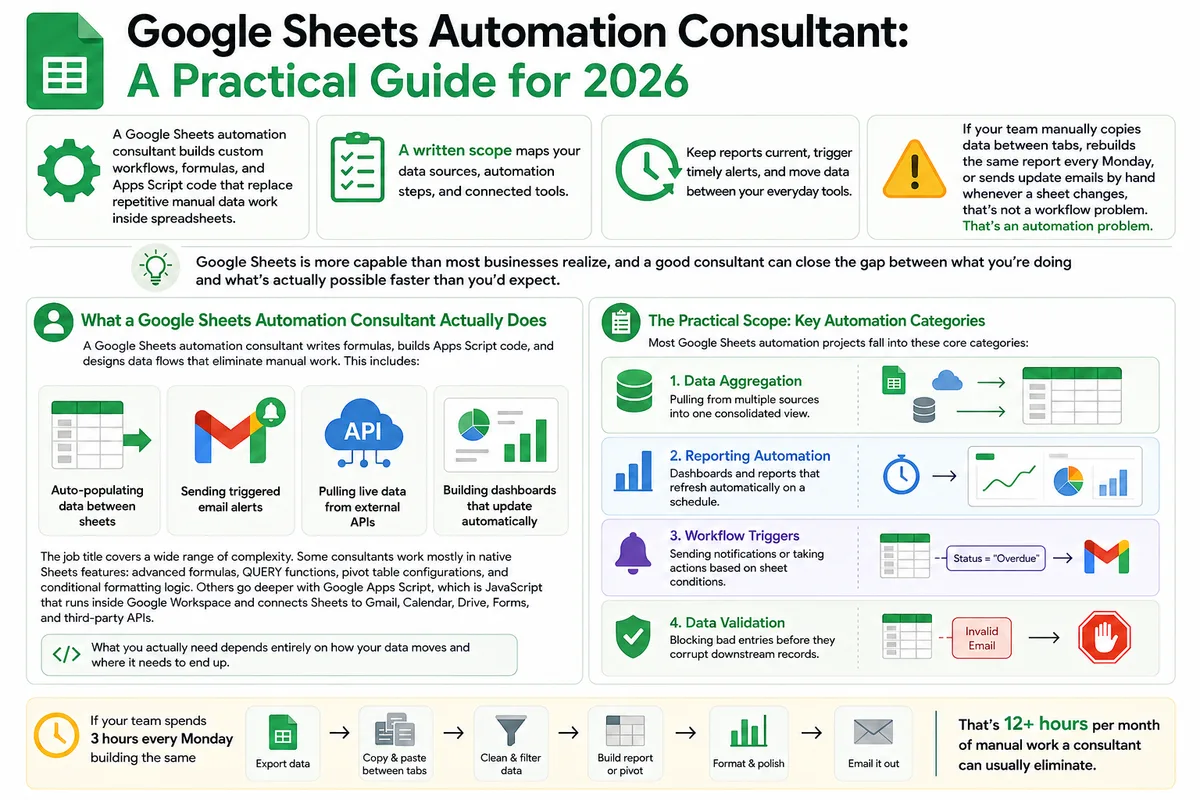
Google Sheets Automation Consultant: A Practical Guide for 2026
Most businesses don't track what spreadsheet work actually costs them. Here's what a Google Sheets automation consultant does in 2026, how to judge the value.
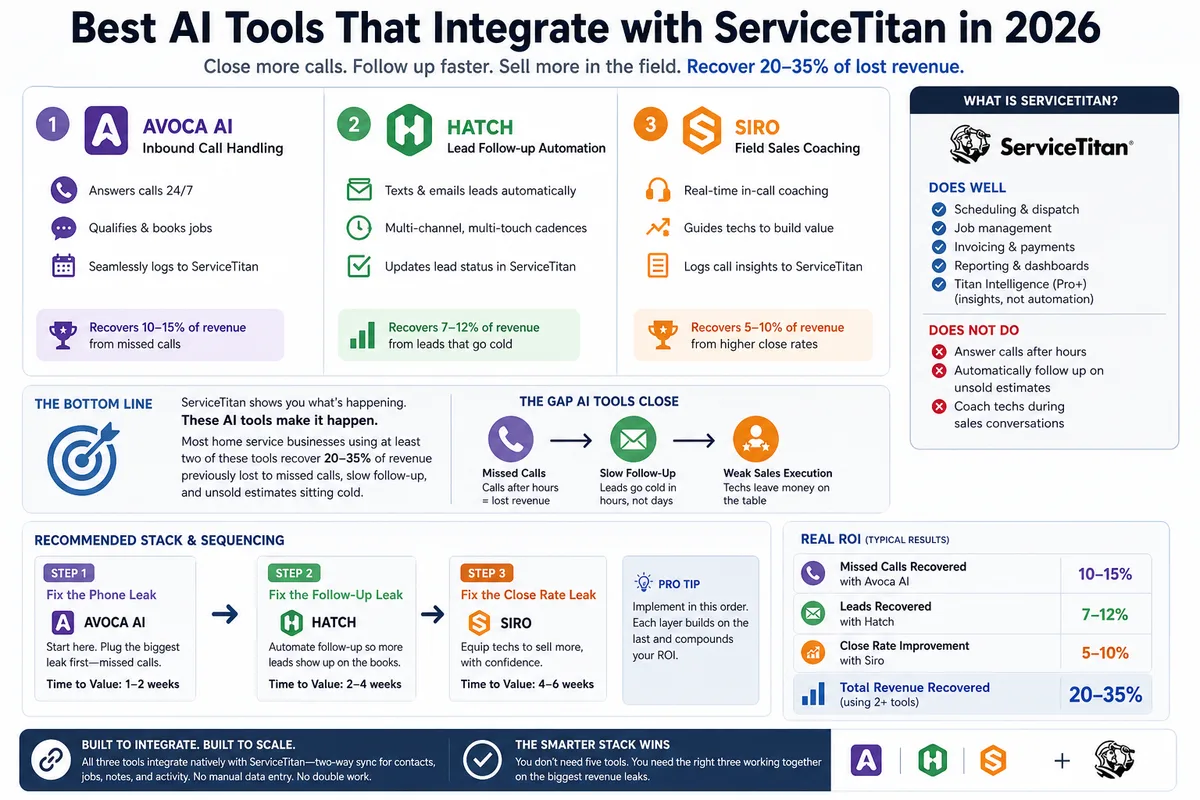
Best AI Tools That Integrate with ServiceTitan in 2026
Most ServiceTitan shops miss a meaningful share of inbound calls and leave most estimates unsold. These AI tools close those gaps inside ServiceTitan.